Building an Invoice Dashboard for Freelancers within a Freelancer Platform
Context
YPLA is an MVP platform for freelancers that automates client paperwork and provides legal and financial support for working with Russian and international clients, including document workflows, tax administration, and cross-border payments.
Design a secure end-to-end invoicing workspace for freelancers.
Discovery
Target audience
Primary audience: Freelance professionals in Russia aged 24-44 – the market core (65% combined: 24-34 = 33%, 34-44 = 32%). They are experienced and financially independent, often juggling multiple projects and needing clear tools to track income, invoices, and payment statuses.
Secondary (fast-growing) audience: Young freelancers aged 18-24 (16.7%), the most dynamic segment with +40% YoY growth (Jan-Oct 2024 vs 2025). They are early-career specialists entering the market quickly and are especially sensitive to simplicity and transparent payments/invoicing.
Define
Сustomer pain points
Invoicing feels overwhelmed because creating an invoice requires a lot of details and manual inputs.
Unclear payment status — users can’t instantly tell if an invoice is paid, overdue, or stuck in processing.
Low trust in fee/tax calculations because the net amount and deductions aren’t transparent.
Awkward, stressful follow-ups — users feel shame/discomfort reminding clients to pay, so they delay chasing payments.
User JTBD
When I need to bill a client for completed work, I want to create and send an invoice quickly and without mistakes, so I can spend less time on admin and get paid sooner.
When I’m managing multiple projects and clients, I want to see what’s paid and overdue at a glance, so I can follow up on time and keep cash flow predictable.
When an invoice is due or overdue, I want the platform to send polite, automated payment reminders (with my control over timing and tone), so I don’t feel awkward or ashamed chasing the client and still get paid on time.
Ideate
User flows
Flow A: Create → Paid
Goal: increase Sent → Paid conversion + grow GMV/commission
Prototype
Overview
Problem
Lack of a clear overview of project payments and earnings.
→
Solution
A centralized dashboard showing project status, order count, paid vs pending income, and earnings over time.
→
Metric
Paid invoice rate
User retention
Monthly Active Users
User satisfaction (NPS / CSAT).
This screen is the main control center for freelancers to monitor invoice performance and take action without opening each invoice one by one. It combines lightweight analytics with a clear status breakdown, helping users spot overdue risks early and follow up before issues turn into support requests.
Invoices (List View)
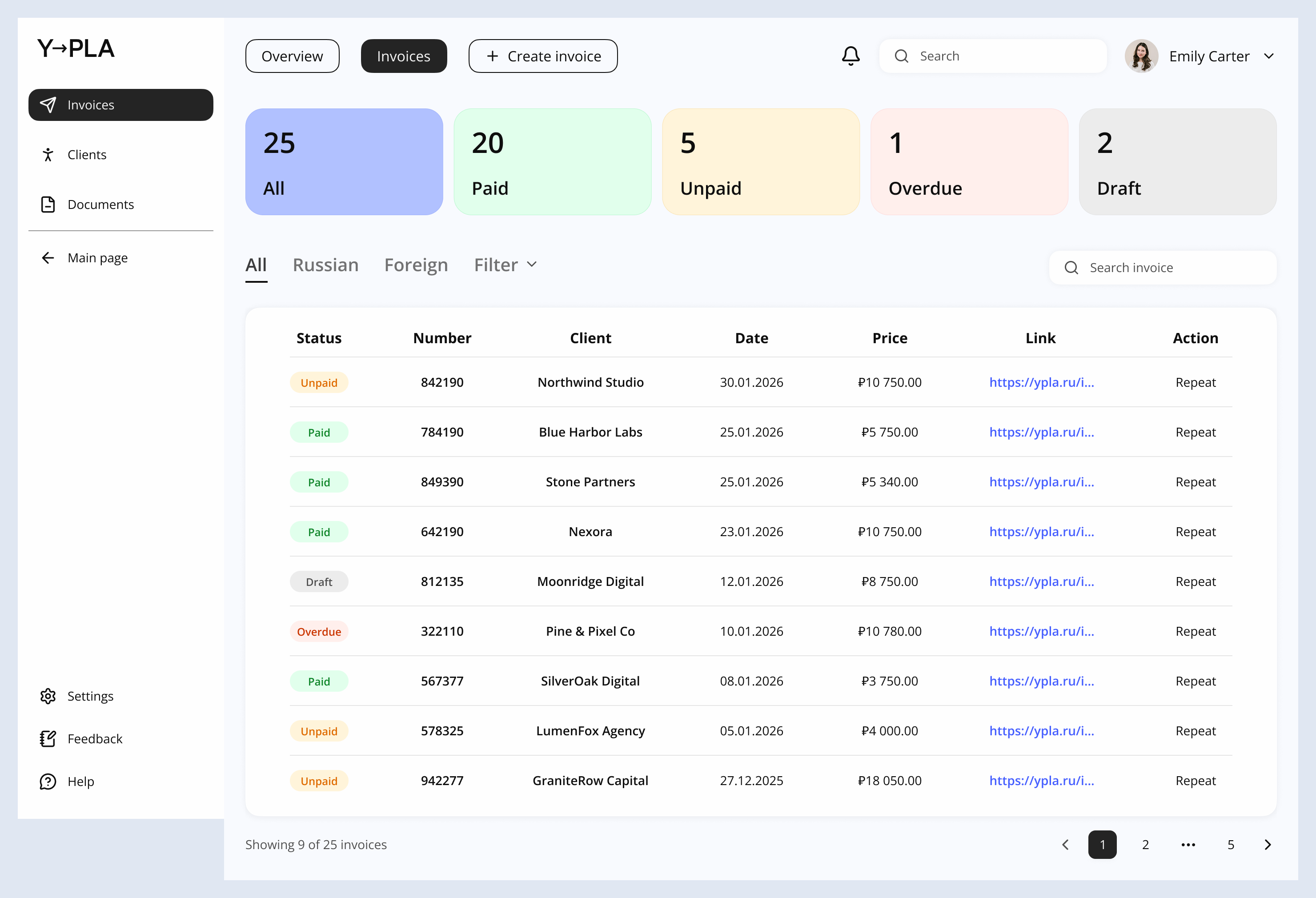
This page is the operational workspace for managing all invoices in one place. It’s designed for fast scanning, filtering, and repeat actions – so a freelancer can quickly understand what’s paid, what needs follow-up, and what can be reused for the next invoice.
Invoice creation
Problem
The invoice workflow is inefficient and error-prone, leading to mistakes and delayed payments.
→
Solution
A streamlined invoice workflow with auto-filled details, editable preview, transparent cost breakdown, and draft saving.
→
Metric
Invoice Creation Completion Rate
Paid Invoice Rate
Invoice Error Rate
!
Invoice creation was split into clear steps to minimize errors through progressive validation and to reduce cognitive load by showing only the information needed at each stage.
Client details
Work description → Price → Files
Summary
Success screen
Key Outcomes
Built an invoice dashboard + end-to-end invoicing flow that helps freelancers send invoices faster and get paid sooner.
Designed status-first navigation (overview + invoices list + invoice details) to surface due/overdue items and make follow-ups effortless.
Added final review (Summary) with editable fields and a transparent fee/tax breakdown to reduce mistakes and build trust.
Implemented a post-send confirmation + status tracking + automated reminders, reducing awkward manual chasing and preventing overdue invoices.
Supported real workflows with PDF/print, drafts, clients & documents as a single source of truth.